Every new tool promises more efficiency. But without clear integration principles, each one chips away at your CRM’s reliability. Here is how to build a tech stack that strengthens your source of truth instead of fragmenting it.

KEY TAKEAWAY: More integrations do not automatically mean a better tech stack. Every tool you connect to your CRM either reinforces or undermines your source of truth. The businesses that scale cleanly are the ones that evaluate every integration through three questions: what decision does this data support, who owns this integration, and is the CRM still the authoritative system? When you treat integration as a governance discipline instead of a convenience, your tech stack becomes an asset instead of a liability.
More Tools Should Mean More Clarity. So, Why Doesn’t It?
Every growing business adds tools. A marketing automation platform. A billing system. A help desk. A project management tool. A scheduling app. A data enrichment service. Each one solves a real problem. Each one generates data. And each one creates a new question: where does this data live, and how does it connect to everything else?
This is the integration trap. You buy tools to make things easier, but without a clear integration strategy, each new tool makes your data landscape more complicated. Fields get duplicated. Definitions drift. Systems start competing to be the source of truth for the same information. And before you know it, nobody is confident that any single system has the right answer.
According to Validity, 31% of CRM admins report that poor quality data costs their company at least 20% of annual revenue. A big part of that problem is not bad data entry. It is bad integration architecture. Data gets created in one system, synced poorly to another, and reported on in a third. The result is three versions of the truth and zero confidence in any of them.
This article explains how integration decisions erode your source of truth, what the warning signs look like, and how to build a HubSpot tech stack that gets stronger as you grow instead of more fragile.
How Integration Decisions Quietly Erode Your Source of Truth
The problem is rarely a single bad integration. It is a pattern of small decisions that compound over time.
Every Tool Brings Its Own Version of the Truth
Your marketing platform has its own contact record. Your billing system has its own customer record. Your help desk has its own ticket record. Each tool stores data in its own format, with its own field names, and its own logic for what counts as a customer, a lead, or an active account. Without governance, you end up with multiple versions of reality and no clear winner.
Integrations Built for Convenience Create Long Term Problems
Someone on the team connects a tool because it was quick and solved an immediate problem. Nobody documents what data is flowing, in which direction, or why. Six months later, the team has changed, the tool has been updated, and the integration is quietly creating duplicate records or overwriting fields that another team depends on. Convenience integrations are technical debt that collects interest.
Syncing Everything Adds Noise, Not Clarity
When you sync every field between every system, you do not get more insight. You get more noise. Properties that are irrelevant to CRM reporting clutter the data model. Fields that mean one thing in the source system and something different in HubSpot create confusion. And every unnecessary sync is another point of failure that can quietly break without anyone noticing.
Undocumented Integrations Become Nobody’s Problem
The most dangerous integrations are the ones nobody remembers building. They run in the background, moving data between systems, until something breaks. Then the team scrambles to figure out what the integration does, who built it, and whether anything critical depends on it. This is how mystery data enters your CRM and why some reports have numbers that nobody can explain.
Six Warning Signs Your Tech Stack Is Undermining Your CRM
These patterns indicate that your integrations are working against your source of truth instead of supporting it:
- The same data lives in multiple systems with different values.
Deal value in HubSpot says one thing. The billing system says another. Nobody knows which is right. - You cannot trace where a data point originated.
When a field value looks wrong, there is no documentation to tell you which system created it, when it was last updated, or why. - New tools are evaluated based on features, not integration fit.
The first question about a new tool should be how it integrates with HubSpot. If integration is an afterthought, data fragmentation is inevitable. - Integrations were set up by people who are no longer on the team.
If nobody currently on staff understands how your systems are connected, you are operating on borrowed time. - Reports from different systems tell different stories.
When marketing reports do not match sales reports, and neither matches finance, the problem is almost always an integration gap. - You have custom fields in HubSpot that nobody recognizes.
Mystery fields are a symptom of integrations that were never documented. They add clutter and erode trust in the data model.
How to Build a HubSpot Tech Stack That Strengthens Your Source of Truth
The goal is not to avoid integrations. It is to build them with intention. Here is a framework that keeps your CRM at the center as your stack grows.
Start Every Tool Decision with One Question
Before you evaluate features, pricing, or user reviews, ask this: how does this tool integrate with HubSpot as our system of record? If the answer is unclear, the tool is a risk. If the answer is “it doesn’t really integrate,” the tool is a bigger risk. Every tool you add should reinforce the CRM’s role as the source of truth, not compete with it.
Choose Native Integrations Over Custom Builds When Possible
Native integrations between HubSpot and tools like email, calendars, marketing platforms, and billing systems are maintained by the vendors themselves. They sync reliably, they update when the platforms update, and they require less internal maintenance. Custom integrations via APIs or third party platforms have their place, but they should be the exception, not the default. Every custom integration needs an owner, documentation, and a maintenance plan.
Define System Ownership for Every Shared Data Field
For every field that exists in more than one system, decide which system owns it. The owner is the system where the field gets created and updated. Every other system that uses that field should receive it via sync, not maintain its own version. This is the single most important integration governance principle. Without it, you will always have competing versions of the truth.
Sync Only What Supports Decisions and Reporting
Before syncing a field, ask what decision it supports. If you cannot point to a specific report, dashboard, or workflow that depends on it, do not sync it. Every unnecessary field in your CRM is one more thing that can go wrong, one more thing that clutters reporting, and one more thing that new hires have to ignore. Less is more when it comes to integration scope.
Document Every Integration You Build
Every integration should have a simple record that includes its purpose, the direction of data flow, the fields being synced, the system that owns each field, and the person accountable for maintaining it. This does not need to be a 20-page document. A shared spreadsheet works. The point is that when something breaks or when a new team member asks, “What does this integration do?”, there is an answer that does not depend on someone’s memory.
Review Your Integration Architecture Quarterly
Tech stacks evolve. Tools get added. Others get deprecated. Integrations that made sense 12 months ago may be creating problems today. Build a quarterly review into your operating rhythm to audit every active integration, confirm it still serves its purpose, verify that the data is flowing correctly, and update the documentation. This is not optional overhead. It is how you keep your source of truth intact as the business grows.
What Changes When Your Tech Stack Supports Your CRM Instead of Fighting It
When integrations are built with governance and intention, the entire business operates with more confidence:
- Reports match across systems because there is a single agreed-upon source of truth for each key field.
- Onboarding new team members is faster because the data model is clean and the integrations are documented.
- Adding new tools becomes low risk because there is a clear framework for evaluating integration fit.
- Leadership trusts the dashboards because the data feeding them has been governed from the point of entry.
- Scaling does not break things because the architecture was designed to grow with the business.
This is the difference between a tech stack assembled and one designed. Assembled stacks accumulate complexity. Designed stacks manage it.

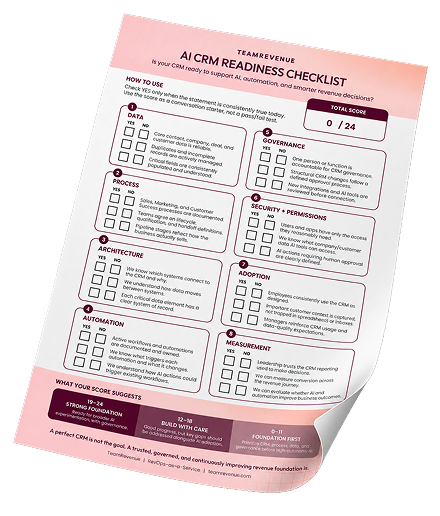
IS YOUR CRM READY FOR AI?
Make sure your CRM foundation is ready. Use the free checklist to uncover gaps before you automate.

The Bottom Line
Every tool you connect to your CRM either strengthens or weakens your source of truth. There is no neutral.
The businesses that scale cleanly are the ones that treat integration as a governance discipline, not a technical convenience. They ask the right questions before they connect a new tool. They document what they build. They assign ownership. And they review their architecture regularly to ensure the system still serves the business, not the other way around.
Start with one question for every tool decision: Does this reinforce or undermine our source of truth? If you hold that standard consistently, your tech stack becomes one of your strongest competitive advantages instead of your biggest operational liability.

WANT THE FULL FRAMEWORK?
Download the free e-book: Driving Business Outcomes with HubSpot. Ten chapters covering the business outcomes every owner should expect from their CRM, from data trust to scaling without breaking.
Frequently Asked Questions
An integration trap happens when businesses connect too many tools to their CRM without a clear governance framework. Each new integration creates more data, more sync points, and more opportunities for conflicting information. Over time, the CRM stops being the source of truth and becomes one of several competing systems.
Common signs include the same field showing different values across systems, reports from different platforms telling different stories, custom fields in your CRM that nobody recognizes or uses, and integrations that were set up by people who are no longer on the team.
Native integrations are almost always the better starting point. They are maintained by the vendors, they update automatically, and they require less internal oversight. Custom API integrations are appropriate when native options do not exist, but they require documentation, an assigned owner, and a maintenance plan to remain reliable over time.
At a minimum, once per quarter. Each audit should confirm that every integration still serves its intended purpose, that data is flowing in the correct direction, that no duplicate or conflicting data is being created, and that documentation and ownership are up to date.
Define system ownership for every shared data field. For any field that exists in more than one system, one system must be the owner where the field is created and updated. Every other system should receive that field via sync. Without this, you will always have competing versions of the same data.
There is no ideal number. The question is not how many integrations you have, but whether each one strengthens your source of truth. A company with five well-governed integrations will have better data quality than a company with 25 ungoverned ones. The quality of the integration design matters more than the quantity.