Most teams are not short on effort.
They are short on focus.
Sales, marketing, and revenue teams spend their days inside HubSpot completing tasks, logging activity, and responding to notifications. From the outside, it looks productive. Inside the business, progress feels slower than it should.
This article addresses a problem business owners recognize immediately:
Teams are busy in HubSpot, but effort is not consistently aligned to outcomes.
This article expands on Chapter 7 of “Driving Business Outcomes with HubSpot: The Business Owner’s Guide to Unlocking the Power of HubSpot”, and shows how HubSpot Segments (formerly Lists), active segments, static segments, and saved views help teams focus effort on what actually moves the business forward.
The Outcome Business Owners Actually Want
Business owners want teams that:
- Spend time on the right leads, deals, and accounts
- Prioritize work based on buyer behavior and readiness
- Reduce low-value, reactive activity
- Make steady progress without burnout
When focus is built into the system, productivity improves without adding pressure.
Why Teams Stay Busy Without Making Meaningful Progress
As businesses grow, HubSpot fills with more records, more activity, and more alerts.
Common symptoms include:
- Reps are treating every lead the same way
- Task queues that never seem to shrink
- Activity measured without context or priority
- Teams are reacting to notifications instead of executing a plan
- Leadership sees motion, but not momentum
This is rarely a discipline problem.
It is a segmentation and visibility problem.
How HubSpot Segmentation Works Today
HubSpot now refers to what were historically called “lists” as Segments.
Segments are how teams group records to drive targeting, automation, reporting, and focus.
There are two core segment types, and they serve very different purposes.
Understanding this distinction is critical to reducing busy work.
Active Segments in HubSpot
Active segments update automatically as records meet or no longer meet defined criteria.
They are best used for:
- Ongoing prioritization
- Automation triggers
- Behavioral and intent-based focus
- Consistent reporting
Examples include:
- Leads showing high-intent behavior
- Deals stalled at a stage beyond a defined threshold
- Accounts that match the ideal customer profile criteria
Active segments keep focus aligned as data changes, without manual effort.
Static Segments in HubSpot
Static segments are fixed snapshots in time.
They are best used for:
- One-time campaigns
- Event follow-ups
- Historical analysis
- Temporary groupings that should not change
Static segments should not be used for daily prioritization or automation. Using them this way creates stale focus and wasted effort.
Saved Views and Filters for Daily Execution
Saved views apply filters directly to CRM objects such as contacts, companies, deals, and tickets.
They are best used for:
- Day-to-day execution
- Role-based focus
- Manager oversight
- Reducing task overload
Examples include:
- Deals needing follow-up today
- Sales-ready leads assigned to a specific rep
- Accounts without recent activity
Saved views are where segmentation turns into daily action.
Common Pitfalls That Create Constant Busy Work
Even teams using HubSpot regularly fall into these traps.
- Treating All Records the Same
Without segmentation, every lead and deal competes equally for attention. - Using Static Segments for Ongoing Focus
Static segments age quickly and misdirect effort. - Duplicating Segmentation Logic
When different teams build their own versions of the same criteria, focus fragments. - Measuring Activity Without Priority
Tracking tasks and calls without intent context rewards motion, not progress.
These mistakes create the illusion of productivity while hiding inefficiency.
Best Practices for Building Focus into HubSpot
High-performing teams design focus into the system.
- Use Active Segments for Prioritization and Automation
Active segments should drive alerts, workflows, and reporting. - Reserve Static Segments for One-Time Use
Keep them out of daily execution paths. - Build Role-Specific Saved Views
Sales, marketing, and service teams should each have views aligned to their responsibilities. - Audit Segments and Views Quarterly
As strategies evolve, segmentation must evolve with them.
When focus is designed intentionally, teams stop chasing noise.
Why This Matters More Than Leaders May Expect
According to Salesforce, only 35% of sales professionals fully trust the accuracy of their data.
When teams lack trust in prioritization or data clarity, they compensate by doing more instead of doing better.
Focus reduces noise. Clarity improves outcomes.
From Activity Overload to Intentional Execution
When focus improves:
- Sales cycles shorten
- Reps feel more in control
- Conversion rates increase
- Burnout decreases
When it does not:
- Activity increases without a payoff
- Teams feel overwhelmed
- Leaders question productivity
- Growth slows
Correct use of HubSpot’s Segments and saved views improves focus.

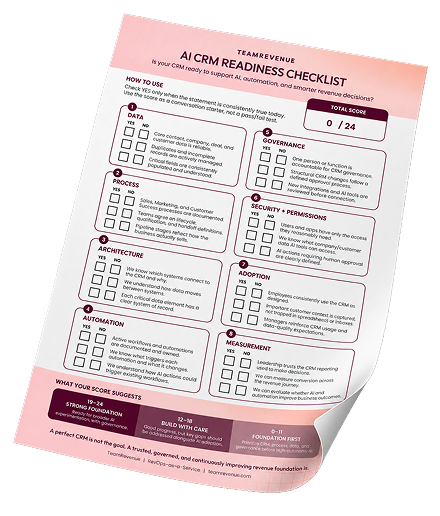
IS YOUR CRM READY FOR AI?
Make sure your CRM foundation is ready. Use the free checklist to uncover gaps before you automate.

Final Thought: Focus Is Designed, Not Demanded
Teams do not need to be told to focus.
They need systems that make focus unavoidable.
When HubSpot Segments, active segments, static segments, and saved views are used correctly, effort aligns naturally with outcomes, and busy work falls away.
Want the Full Guide?
This article expands on one chapter from Driving Business Outcomes with HubSpot, a practical guide designed to help business owners reduce busy work and improve execution clarity.
The e-book walks through:
- How to structure HubSpot for focus
- Common segmentation mistakes to avoid
- Best practices for aligning effort with outcomes
If your team feels busy but progress feels slow, the complete guide will help you redesign your focus at the system level.
Download the complete e-book to continue building clarity, prioritization, and execution discipline.